Loading...
AI-Powered Architecture

Enterprise-Grade Diagrams from Natural Language

ArchGPT is a free AI architecture diagram generator that helps developers, architects and engineers create UML, C4, sequence and system architecture diagrams instantly from natural language prompts.

0
Diagrams Generated
0
Active Users
0
Diagram Types
0
% Uptime
Process

How ArchGPT Works

Create complex architecture diagrams in four simple steps using our AI.

Input Prompt

1. Describe Your System

Simply type your requirements in plain English. No complex syntax needed.

AI Processing

2. AI Processing

Our advanced AI analyzes your text and structures the architecture logically.

Diagram Output

3. Instant Diagram

Get a beautiful, enterprise-grade diagram ready to download and share.

Explain Diagram

4. Explain Diagram

Click Explain to get a clear, step-by-step breakdown. Download as PDF, DOCX, or text.

Next-Gen Experience

Visualize Complex Ideas Effortlessly

Bridge the gap between text and architecture. Our AI-powered platform gives you the tools to turn abstract concepts into tangible visual blueprints in seconds.

  • Real-time rendering
  • Multiple export formats
  • Secure and private
Get Started Free
Visualization
Collaboration
Team Alignment

Perfect for Modern Teams

Whether you're a product manager mapping out features, or an engineer designing scalable systems, ArchGPT brings everyone onto the same page visually.

Say goodbye to confusing whiteboard sessions and hello to crystal-clear diagrams generated on the fly.

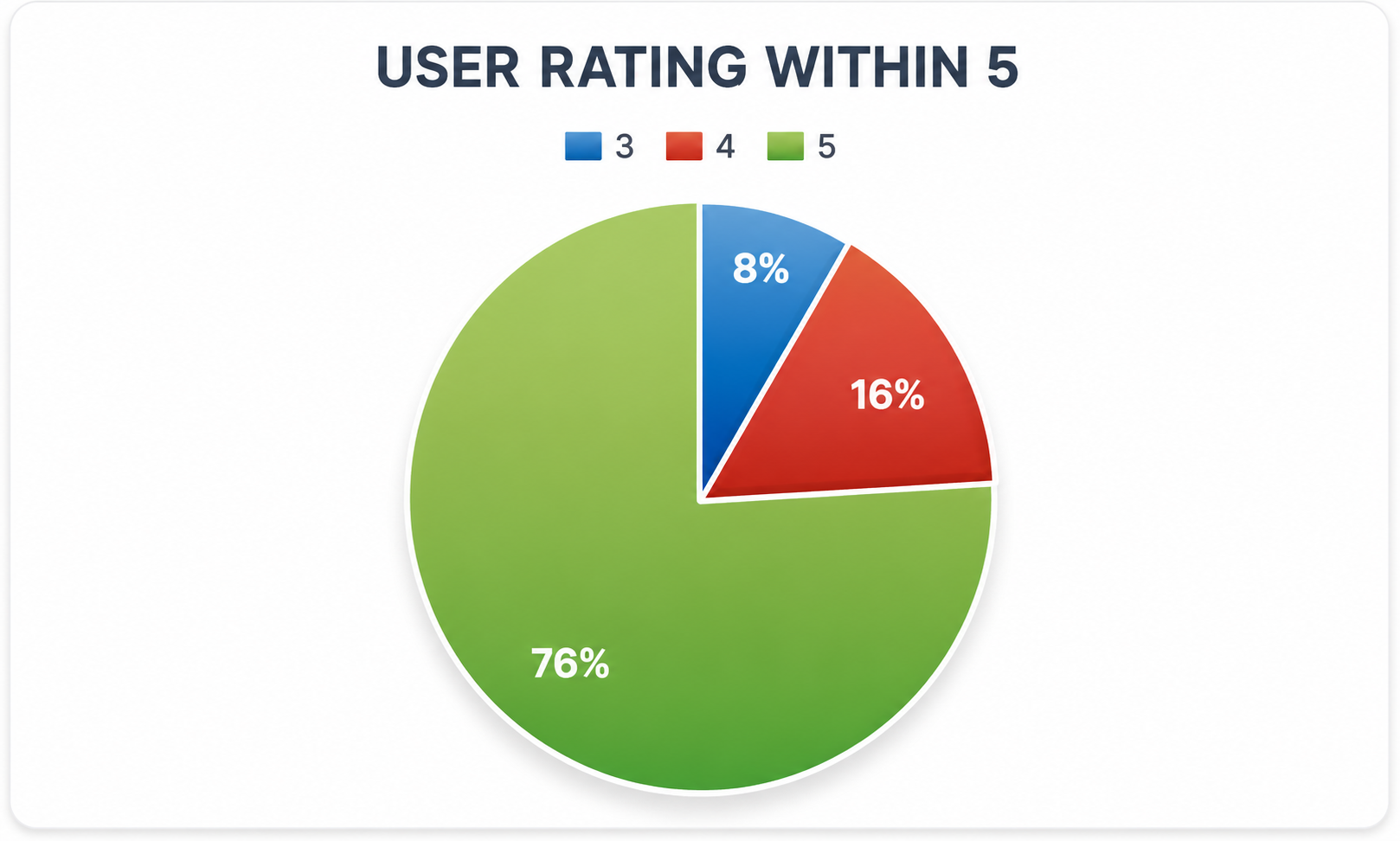
Feedback

User Feedback

See the user satisfaction ratings and testimonials.

User Feedback Rating
User Rating

Experience the Power of AI in Diagramming

ArchGPT makes diagram creation effortless. Whether you need to visualize system architecture, create UML models, or design data schemas -- our AI-powered diagram generator understands your prompts and produces clear, accurate diagrams instantly.

Multiple Diagram Types

Generate UML, ER, flowcharts, C4 context, sequence, use case, component, and deployment diagrams -- all from text.

AI-Powered Generation

Our advanced AI understands your requirements and creates accurate, detailed diagrams automatically, saving hours of work.

Code as Diagram

Transform your architectural ideas or code descriptions into visual diagrams. Perfect for documentation and design communication.

Easy to Use

Simple, intuitive interface. Just type your prompt -- no learning curve. Let our AI handle the complexity.

Fast and Efficient

Generate professional diagrams in seconds. Optimized for speed without sacrificing quality or accuracy.

Secure Login

Sign in with Google for a secure, seamless experience. Your diagrams and history are safely tied to your account.

AI Diagram Explanation

Click Explain on any generated diagram to get a clear, step-by-step breakdown. Copy the text, or download as PDF, DOCX, or plain text.

Export Anywhere

Download diagrams as PNG, JPEG, SVG, or PDF. All exports include a watermark and are ready for presentations or documentation.

Who Can Use ArchGPT?

Trusted by professionals across different industries

Software Developer
Software Devs

Software Developers

Technical Professionals

Visualize your code architecture and system design without spending hours on manual diagram creation.

  • Convert code to diagrams instantly
  • Document architecture easily
  • Communicate designs with teams
Business Analyst
Analysts

Business Analysts

Strategic Planning

Create flowcharts and process diagrams to map out business workflows and requirements effortlessly.

  • Map business processes
  • Create requirement diagrams
  • Present workflows clearly
Product Manager
PMs

Product Managers

Product Vision

Generate diagrams from product descriptions to visualize features, workflows, and system interactions.

  • Visualize product features
  • Create user flow diagrams
  • Align team understanding
Students
Students

Students & Educators

Learning & Teaching

Learn UML and system design concepts by generating diagrams from descriptions. Perfect for academic projects.

  • Learn UML concepts
  • Complete projects faster
  • Understand complex systems
FAQs

Frequently Asked Questions

ArchGPT is an AI-powered diagram generator that creates UML and software architecture diagrams from plain text prompts. Sign in with Google to get started.

Yes, ArchGPT is completely free to use. There are no subscriptions or hidden costs. Just sign in with your Google account to start generating diagrams.

ArchGPT supports a wide range of diagrams, including Class, Sequence, Flowchart, Entity-Relationship (ER), C4 Context, C4 Container, Use Case, Component, and Deployment diagrams.

Once a diagram is generated, click the Download button and select your preferred format: PNG, JPEG, SVG, or PDF.

No, you don't need to know any specific syntax. Just describe your requirement in plain English. For best results, be clear and concise.

ArchGPT is for software developers, system architects, business analysts, product managers, students, and educators. Anyone who needs to quickly visualize a system or process can benefit from it.

Yes! After generating a diagram, click the Explain button to get a clear, step-by-step breakdown in plain English. You can copy the text, or download it as a PDF, DOCX, or plain text file for your design documents.
Back to top